We’ve updated the Relay experience to bring you more details on your transactions and more abilities to further refine. These changes include an updated category system, richer transaction details, and enhanced tools to filter and analyze your spending.
What happened to the old Relay categories?
We’ve moved from a flat list of categories to a hierarchical system with primary categories (e.g., “Food & drink”) that break into more detailed sub-categories (e.g., “Groceries” and “Restaurants & bars, etc.”). This structure gives more nuance to quickly understand where your money goes.
Some of the old categories were combined, renamed, or redistributed to fit the new structure. For example, “Food” is now “Food & drink,” and “Groceries” sits under it. A few old categories were removed and mapped to clearer destinations. This structure was informed from early feedback by our members.
Why have some of my past transactions changed categories?
We migrated to a new provider to super power our categorization ability with the goal of making your spend even clearer.
What happened to my recategorized transactions?
As part of the category shifting, we’ve cleaned up merchant names (e.g., we grouped “AMAZON MKTPL*…” under “Amazon”) and remapped your existing re-categorization rules to our new structure. This means some of your older merchant-level rules may not apply exactly as before. If you notice mismatches, you can quickly create rules in the new experience on the web or on the mobile app, and they’ll correctly categorize new and old transactions.
How can I recategorize transactions?
You can recategorize at the individual transaction level and at the merchant level.
On web:
- Open Relay and go to your transactions list. Select a transaction, choose Category, pick a primary and detailed category, then save.
- To apply the change to every transaction from the same merchant, use “Apply to all activity from this merchant” on the transaction details page.
On mobile:
- Open a transaction, choose Category, select your primary and detailed category, then save.

Tip: If one of your old rules isn’t working after our changes, make it again at the Merchant level on the web or on the mobile app. It’ll update past and future transactions.
What new spending features are available?
- More specific categories: >15 categories + >100 subcategories for sharper insights and budgeting.
- Headline categories: Based on feedback, we brought back 'Kids' & 'Business'.
- Sub-category level insights: On the app, see your spend totals, % of spending, & historical spend in those areas.
- Clearer merchant info: Cleaned up merchant names, logos, locations, and websites — so purchases are instantly recognizable.
- Download to CSV (web only): Once exported, you can then easily port your analysis into Excel or Google Sheets. (How do I export my transactions from Relay? – SoFi)
- Month‑over‑month category trends: See how your category spending changes over time.
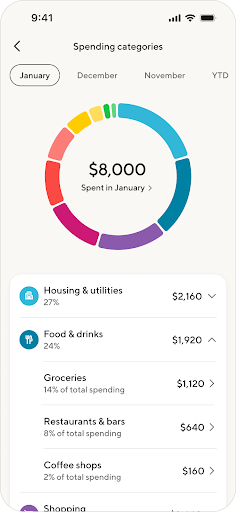
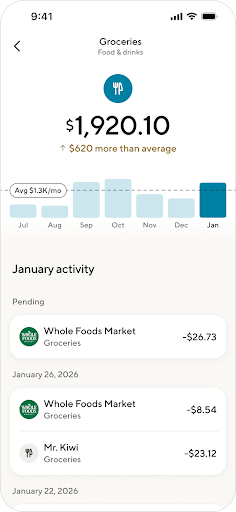


What categories count towards my spending?
Spend insights include all transactions outside of income, transfers, debt payments and investment transfers. This exclusion is intended to keep your spending totals more representative of your day‑to‑day spending.
How can I filter my transactions?
Inside your transaction activity view, you can filter by sub-category, date, or amount to narrow results and quickly focus on what you need. On the web, use Export to CSV for deeper sorting in a spreadsheet.
Web:

Mobile:


What updates have we made to recurring activity detection?
We have upgraded our recurring activity detection to better identify relevant transactions and help you manage your spend.
What’s included in recurring expenses?
Our recurring expense detection includes transactions that meet all of the following criteria:
- Spend-Related: The transaction is considered spend (it excludes income, transfers, and investment transfers).
- Historical Patterns: There are at least two historical instances that occur consistently around the same time (weekly, monthly, annually, etc.) with the same merchant.
- Future Obligation: We anticipate a future obligation to pay for the transaction unless it is canceled or completed. This means we do not consider "regular" or habitual purchases as recurring (e.g. Uber rides).
This includes your subscriptions, rent/mortgage bills, utility bills, and buy now/pay later expenses.