Skip Navigation
Log InGet Started

Legal

  • Terms of Use
  • Disclaimers
  • Licenses
  • NMLS Access
  • Eligibility Criteria
  • Accessibility
  • Business Continuity

Company

  • About Us
  • How it Works
  • Reviews
  • Press
  • Our Values
  • Jobs
  • Blog

Find us

2750 East Cottonwood Parkway #300
Cottonwood Heights, Utah 84121

Annual percentage yield (APY) is variable and subject to change at any time. Rates are current as of 10/20/26. There is no minimum balance requirement. Fees may reduce earnings. Additional rates and information can be found at https://www.sofi.com/legal/banking-rate-sheet.


Eligible Direct Deposit means a recurring deposit of regular income to an account holder’s SoFi Checking or Savings account, including payroll, pension, or government benefit payments (e.g., Social Security), made by the account holder’s employer, payroll or benefits provider or government agency (“Eligible Direct Deposit”) via the Automated Clearing House (“ACH”) Network every 31 calendar days.


Although we do our best to recognize all Eligible Direct Deposits, a small number of employers, payroll providers, benefits providers, or government agencies do not designate payments as direct deposit. To ensure you're earning the APY for account holders with Eligible Direct Deposit, we encourage you to check your APY Details page the day after your Eligible Direct Deposit posts to your SoFi account. If your APY is not showing as the APY for account holders with Eligible Direct Deposit, contact us at 855-456-7634 with the details of your Eligible Direct Deposit. As long as SoFi Bank can validate those details, you will start earning the APY for account holders with Eligible Direct Deposit from the date you contact SoFi for the next 31 calendar days. You will also be eligible for the APY for account holders with Eligible Direct Deposit on future Eligible Direct Deposits, as long as SoFi Bank can validate them.


Deposits that are not from an employer, payroll, or benefits provider or government agency, including but not limited to check deposits, peer-to-peer transfers (e.g., transfers from PayPal, Venmo, Wise, etc.), merchant transactions (e.g., transactions from PayPal, Stripe, Square, etc.), and bank ACH funds transfers and wire transfers from external accounts, or are non-recurring in nature (e.g., IRS tax refunds), do not constitute Eligible Direct Deposit activity. There is no minimum Eligible Direct Deposit amount required to qualify for the stated interest rate. SoFi Bank shall, in its sole discretion, assess each account holder's Eligible Direct Deposit activity to determine the applicability of rates and may request additional documentation for verification of eligibility. See additional details at https://www.sofi.com/legal/banking-rate-sheet.


SoFi Bank, N.A. NMLS #696891, Member FDIC

SoFi Lending Corp. NMLS #1121636

234 1st Street, San Francisco, CA 94105

©2026 Social Finance, Inc. All rights reserved.

Norton Secured, powered by VeriSignTLS 1.2 Encrypted
Equal Housing Lender
  1. Help Center
  2. Chevron RightSearch
Search

What updates have we made to our spend categories and tools?

last month · Updated

  • How do I make a cash deposit into my SoFi Money account?Chevron Right
  • Payments and Your SoFi Personal LoanChevron Right
  • Additional Info on SoFi’s Parent Private Student Loans!Chevron Right
What updates have we made to our spend categories and tools?Chevron Right
  • Enroll in the Student Loan Contribution ProgramChevron Right
  • SoFi Credit Card: Interest Rates, APR, and FeesChevron Right
  • Completing Balance Transfers with SoFi Credit CardsChevron Right
  • Can I make payments to the Smart Card without Autopay?Chevron Right
  • What’s the difference between Smart Card and a debit card?Chevron Right
  • What is Autopilot?Chevron Right
  • SoFi Money AutopilotChevron Right
  • Crypto Purchases with Apple Pay, Google Pay, and Debit CardsChevron Right
  • How do I add a bank account to use as a payment method for my Loan?Chevron Right
  • The Basics of SoFi’s Student Loan Refinancing!Chevron Right
  • General SoFi Student Loan InformationChevron Right
  • Autopay for a SoFi LoanChevron Right
  • What Happens If My Loan Status Changes During Student Loan Payment Verification?Chevron Right
  • Manage Your Student Loan Payment Verification ProgramChevron Right
  • Everything You Need to Know About Small Business Loans!Chevron Right
  • Everything You Need to Know About Private Student Loan Disbursements and FundingChevron Right
  • We’ve updated the Coach experience to bring you more details on your transactions and more abilities to further refine. These changes include an updated category system, richer transaction details, and enhanced tools to filter and analyze your spending.
     

    What happened to the old Coach categories?
     

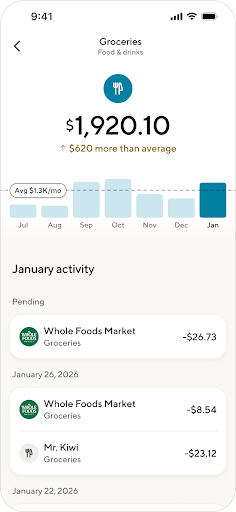
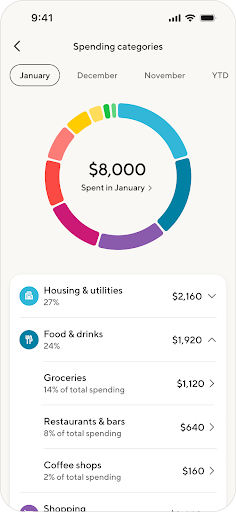
    We’ve moved from a flat list of categories to a hierarchical system with primary categories (e.g., “Food & drink”) that break into more detailed sub-categories (e.g., “Groceries” and “Restaurants & bars, etc.”). This structure gives more nuance to quickly understand where your money goes. 
     

    Some of the old categories were combined, renamed, or redistributed to fit the new structure. For example, “Food” is now “Food & drink,” and “Groceries” sits under it. A few old categories were removed and mapped to clearer destinations. This structure was informed from early feedback by our members. 


    Why have some of my past transactions changed categories?

    We migrated to a new provider to super power our categorization ability with the goal of making your spend even clearer.
     

    What happened to my recategorized transactions? 
     

    As part of the category shifting, we’ve cleaned up merchant names (e.g., we grouped “AMAZON MKTPL*…” under “Amazon”) and remapped your existing re-categorization rules to our new structure. This means some of your older merchant-level rules may not apply exactly as before. If you notice mismatches, you can quickly create rules in the new experience on the web or on the mobile app, and they’ll correctly categorize new and old transactions. 
     

    How can I recategorize transactions? 


    You can recategorize at the individual transaction level and at the merchant level.


    On web:

    • Open Coach and go to your transactions list. Select a transaction, choose Category, pick a primary and detailed category, then save.
    • To apply the change to every transaction from the same merchant, use “Apply to all activity from this merchant” on the transaction details page.
       

    On mobile:

    • Open a transaction, choose Category, select your primary and detailed category, then save. 
       

    Relay HCA.png

    Tip: If one of your old rules isn’t working after our changes, make it again at the Merchant level on the web or on the mobile app. It’ll update past and future transactions.


    What new spending features are available?


    • More specific categories: >15 categories + >100 subcategories for sharper insights and budgeting. 
    • Headline categories: Based on feedback, we brought back 'Kids' & 'Business'.
    • Sub-category level insights: On the app, see your spend totals, % of spending,  & historical spend in those areas.
    • Clearer merchant info: Cleaned up merchant names, logos, locations, and websites — so purchases are instantly recognizable.
    • Download to CSV (web only): Once exported, you can then easily port your analysis into Excel or Google Sheets. (How do I export my transactions from Coach? – SoFi) 
    • Month‑over‑month category trends: See how your category spending changes over time.
       Relay HCA 2.pngRelay HCA 3.png

    What categories count towards my spending?


    Spend insights include all transactions outside of income, transfers, debt payments and investment transfers. This exclusion is intended to keep your spending totals more representative of your day‑to‑day spending.


    How can I filter my transactions?
     

    Inside your transaction activity view, you can filter by sub-category, date, or amount to narrow results and quickly focus on what you need. On the web, use Export to CSV for deeper sorting in a spreadsheet.
     

    Mobile:

    Relay HCA 6.pngRelay HCA 5.png


    What updates have we made to recurring activity detection?


    We have upgraded our recurring activity detection to better identify relevant transactions and help you manage your spend.


    What’s included in recurring expenses?


    Our recurring expense detection includes transactions that meet all of the following criteria:

    • Spend-Related: The transaction is considered spend (it excludes income, transfers, and investment transfers).
    • Historical Patterns: There are at least two historical instances that occur consistently around the same time (weekly, monthly, annually, etc.) with the same merchant.
    • Future Obligation: We anticipate a future obligation to pay for the transaction unless it is canceled or completed. This means we do not consider "regular" or habitual purchases as recurring (e.g. Uber rides).  

    This includes your subscriptions, rent/mortgage bills, utility bills, and buy now/pay later expenses.