Tuition Reimbursement Reviews and Balances
5 days ago · Updated
If you have questions about a rejected review or want to understand how much reimbursement you have left, you can find both in your At Work Portal.
What should I do if my request was sent back or declined?
Log in to your SoFi At Work Dashboard and open the Tuition Reimbursement benefit. Open the request to see who reviewed it and what action is needed. Your employer reviews the first submission. SoFi reviews the transcript and receipt after the course.
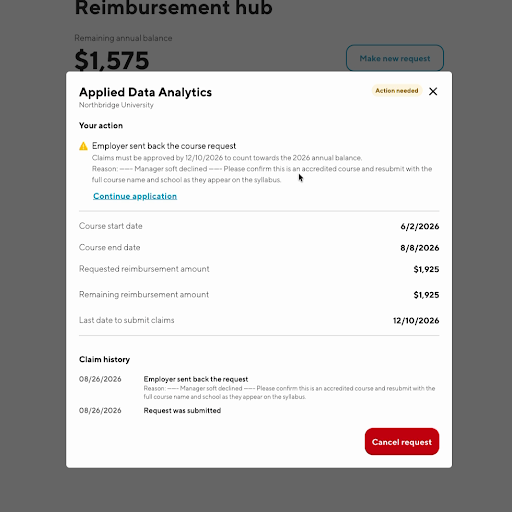
- Action needed after employer review — the request says Employer sent back the course request. Use Continue application, update it, and resubmit. Questions go to your supervisor or HR.
- Employer declined — the request is closed. Contact your supervisor or HR.
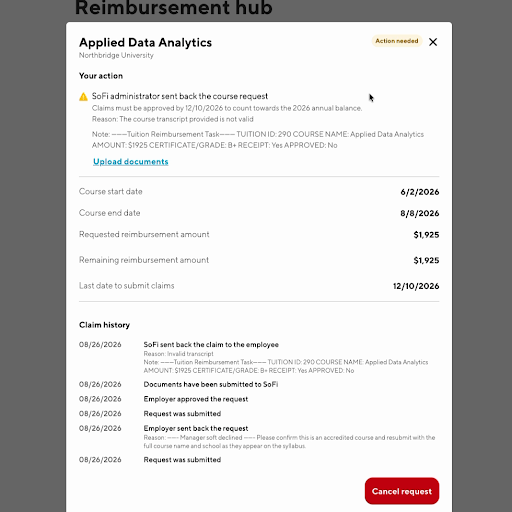
- Action needed after SoFi review — the request says SoFi administrator sent back the course request. Use Upload documents. Questions go to SoFi.
- SoFi declined — the request is closed. Contact SoFi.
After your employer sends a request back, the status is Action needed. Open it to see Employer sent back the course request, then select Continue application.
After SoFi sends a request back, the status is Action needed. Open it to see SoFi administrator sent back the course request, then select Upload documents.
Who should I contact if my initial course review form is rejected?
We recommend logging in to review the reason your request was rejected through your At Work Dashboard first.
If you still have questions after reviewing the reason, please contact your direct supervisor or HR Benefits admin for additional help.
What is the annual remaining balance and how is it calculated?
Your employer sets the total annual amount available for Tuition Reimbursement and any related benefit rules.
Your annual remaining balance is your employer’s annual maximum minus:
- Any previous tuition reimbursements, and
- Any employer payments made toward other benefits you are enrolled in during that same calendar year.
Because eligibility terms can vary by employer, your remaining balance and reimbursement rules may differ depending on your company’s program setup.