3 weeks ago · Updated
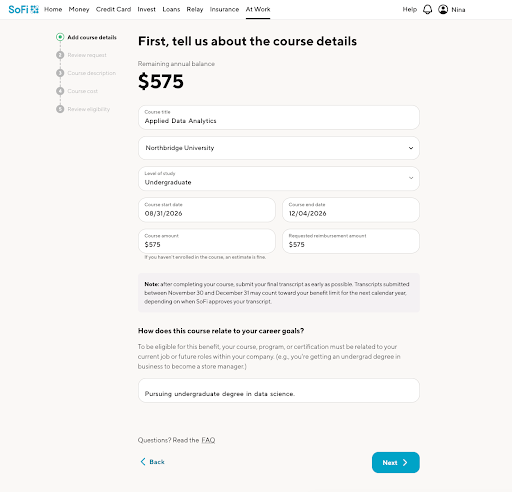
If your employer offers Tuition Reimbursement through SoFi At Work, you can submit your reimbursement request and supporting documents online through your At Work Dashboard.
Start by logging in to your SoFi At Work Dashboard and opening the Tuition Reimbursement benefit. From there, follow the prompts in the Tuition Reimbursement Portal to enter your course details and upload your documents.
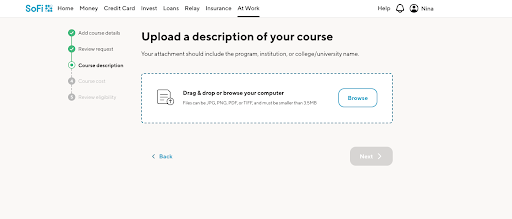
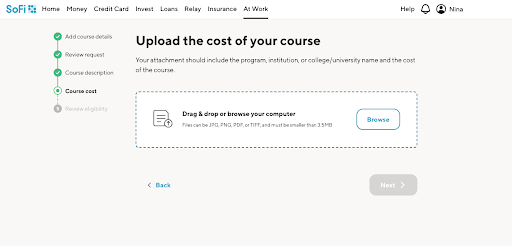
Please note: you must submit a reimbursement request for the course before the course start date. Retroactive requests are not considered.
The documentation you need can vary based on your employer and where you are in the process, but in general you may be asked to provide documents that confirm the course details, cost, and successful completion.
Examples of documents that may be requested include:
Unofficial transcripts may be accepted.
Whenever you upload a document for the Course Description, or the Course Cost, the Document Analyzer Tool reviews uploaded documents in real time and provides feedback if something appears missing or incorrect.
You can find it in the Tuition Reimbursement product card under the Courses tab by selecting View Details.
If a document is marked Your document looks good!, your document meets all standards needed for review.
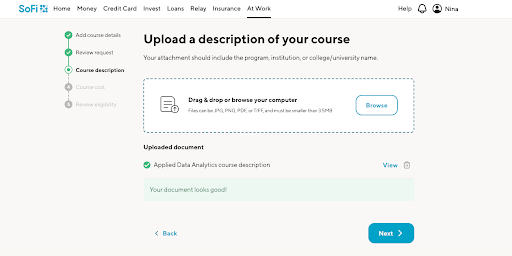
If validation errors appear, a message saying We found some issues: will appear. Use them as guidance to update or correct your documents.
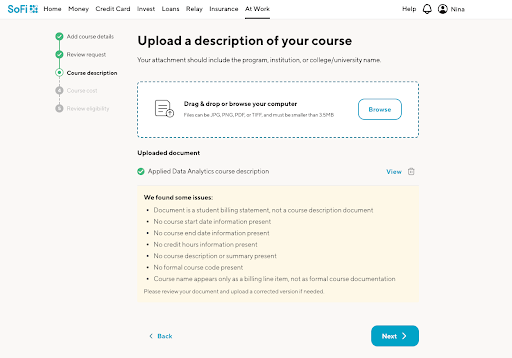
You can still submit documents even if errors are flagged by clicking Next. The issues listed are just suggestions.
Have more questions? Chat with us or call 855-456-7634 to speak with an agent.