Skip Navigation
Log InGet Started

Legal

  • Terms of Use
  • Disclaimers
  • Licenses
  • NMLS Access
  • Eligibility Criteria
  • Accessibility
  • Business Continuity

Company

  • About Us
  • How it Works
  • Reviews
  • Press
  • Our Values
  • Jobs
  • Blog

Find us

2750 East Cottonwood Parkway #300
Cottonwood Heights, Utah 84121

Annual percentage yield (APY) is variable and subject to change at any time. Rates are current as of 10/20/26. There is no minimum balance requirement. Fees may reduce earnings. Additional rates and information can be found at https://www.sofi.com/legal/banking-rate-sheet.


Eligible Direct Deposit means a recurring deposit of regular income to an account holder’s SoFi Checking or Savings account, including payroll, pension, or government benefit payments (e.g., Social Security), made by the account holder’s employer, payroll or benefits provider or government agency (“Eligible Direct Deposit”) via the Automated Clearing House (“ACH”) Network every 31 calendar days.


Although we do our best to recognize all Eligible Direct Deposits, a small number of employers, payroll providers, benefits providers, or government agencies do not designate payments as direct deposit. To ensure you're earning the APY for account holders with Eligible Direct Deposit, we encourage you to check your APY Details page the day after your Eligible Direct Deposit posts to your SoFi account. If your APY is not showing as the APY for account holders with Eligible Direct Deposit, contact us at 855-456-7634 with the details of your Eligible Direct Deposit. As long as SoFi Bank can validate those details, you will start earning the APY for account holders with Eligible Direct Deposit from the date you contact SoFi for the next 31 calendar days. You will also be eligible for the APY for account holders with Eligible Direct Deposit on future Eligible Direct Deposits, as long as SoFi Bank can validate them.


Deposits that are not from an employer, payroll, or benefits provider or government agency, including but not limited to check deposits, peer-to-peer transfers (e.g., transfers from PayPal, Venmo, Wise, etc.), merchant transactions (e.g., transactions from PayPal, Stripe, Square, etc.), and bank ACH funds transfers and wire transfers from external accounts, or are non-recurring in nature (e.g., IRS tax refunds), do not constitute Eligible Direct Deposit activity. There is no minimum Eligible Direct Deposit amount required to qualify for the stated interest rate. SoFi Bank shall, in its sole discretion, assess each account holder's Eligible Direct Deposit activity to determine the applicability of rates and may request additional documentation for verification of eligibility. See additional details at https://www.sofi.com/legal/banking-rate-sheet.


SoFi Bank, N.A. NMLS #696891, Member FDIC

SoFi Lending Corp. NMLS #1121636

234 1st Street, San Francisco, CA 94105

©2026 Social Finance, Inc. All rights reserved.

Norton Secured, powered by VeriSignTLS 1.2 Encrypted
Equal Housing Lender
  1. Help Center
  2. Chevron RightSearch
Search

How do I manually connect my bank account to my SoFi Invest account without Plaid?

4 months ago · Updated

  • SoFi Credit Card: Interest Rates, APR, and FeesChevron Right
  • I didn't get my 1% match on deposits into taxable SoFi Invest Accounts. Why?Chevron Right
  • Invest 1% IRA Deposit MatchChevron Right
SoFi Credit Card Card PaymentsChevron Right
  • SoFi Credit Card: How do Cash Advances work?Chevron Right
  • How to transfer money from my SoFi Money account to another accountChevron Right
  • How to transfer money from my SoFi Bank account to another accountChevron Right
  • How do I link my SoFi Money account to my SoFi Invest account?Chevron Right
  • How do I manually connect my bank account to my SoFi Invest account without Plaid?Chevron Right
  • How do I connect my bank link to a SoFi Invest account?Chevron Right
  • How do I set up a one-time contribution to my SoFi Invest account?Chevron Right
  • Can I instantly transfer funds from my SoFi Invest account to my SoFi Checking or Savings account?Chevron Right
  • How to close a SoFi Invest accountChevron Right
  • Can I make wire transfers from my SoFi Money cash management account?Chevron Right
  • If you have attempted linking your bank account to your SoFi Invest account, but Plaid is not able to locate that institution or is not able to pull the account information, you will need to manually enter your account information. Please follow the steps below:


    SoFi App

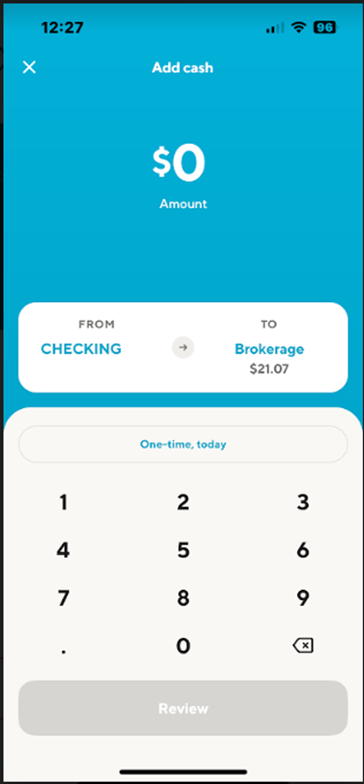
    To manually link bank accounts for ACH deposits/withdrawals via the mobile app, go to your SoFi Invest account on the app, tap on the “Trade” button in the bottom right corner of the screen, select ‘Add cash’ and follow the steps below. You can also click on this link to open the 'transfers' page.

    1. Tap on From
      Image from "How do I manually connect my bank account to my SoFi Invest account without Plaid?"
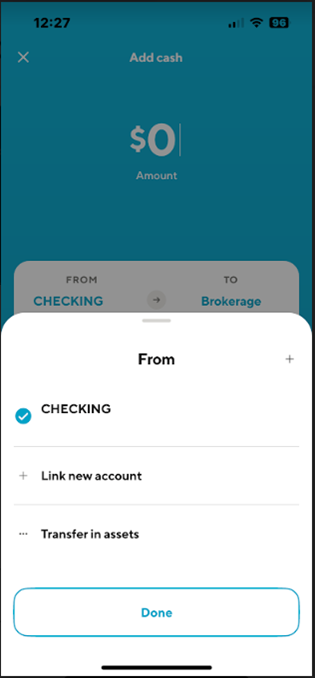
    2. Select Link a new account
      Image from "How do I manually connect my bank account to my SoFi Invest account without Plaid?"
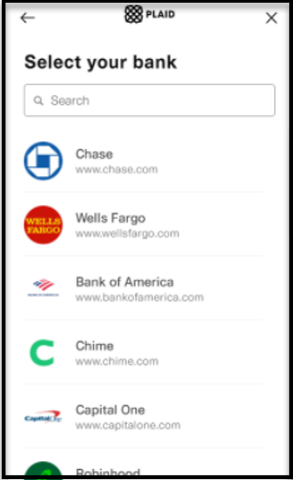
    3. You will be redirected to our 3rd party partner, Plaid. If your bank is not coming up via the search function, you can tap on the 'X' in the top right corner.
      mceclip2.png
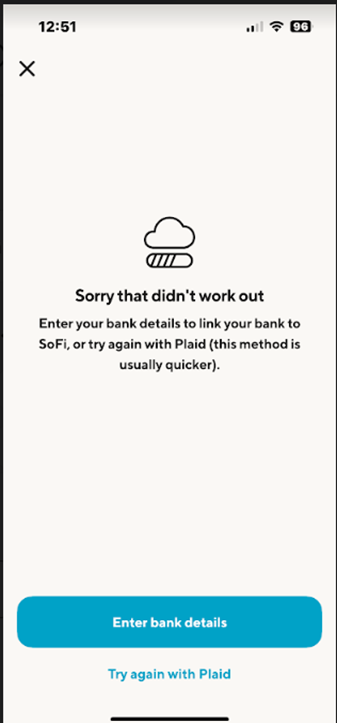
    4. Then tap on Enter Bank Details
      Image from "How do I manually connect my bank account to my SoFi Invest account without Plaid?"
    5. Enter all applicable information and tap on Next
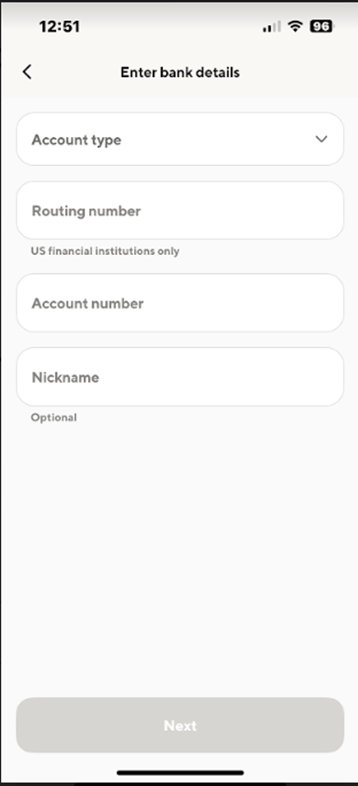
      Image from "How do I manually connect my bank account to my SoFi Invest account without Plaid?"

    You can now schedule your deposit with your new bank link. Enter the amount you want to deposit then tap on Review deposit then you will Confirm the deposit.


    SoFi Website

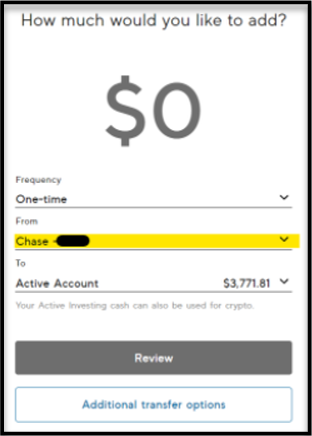
    To manually link bank accounts for ACH deposits/withdrawals via the website, go to your SoFi Invest account on SoFi.com, click on ‘Add cash’, and follow the steps below. You can also click on this link to open the 'transfers' page.

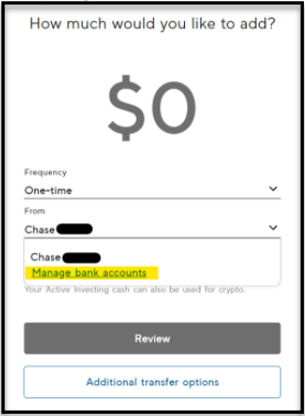
    1. Click on From or To
      mceclip6.png
    2. Select Manage bank accounts
      mceclip7.png
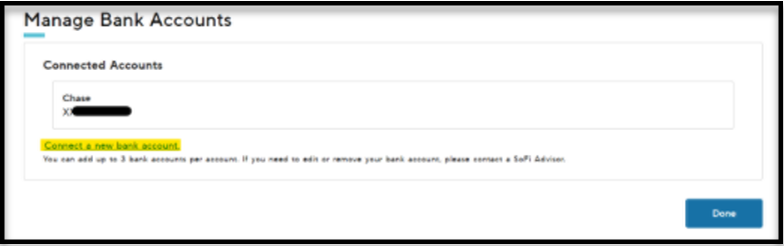
    3. Click on Connect a new bank account
      mceclip8.png
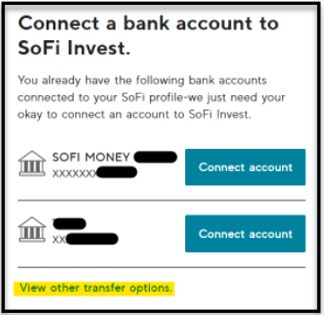
    4. If you have bank accounts previously linked to your Invest account or linked to some of your other SoFi accounts, you have the option to click on one of those. If not, click on View other transfer options
      mceclip9.png
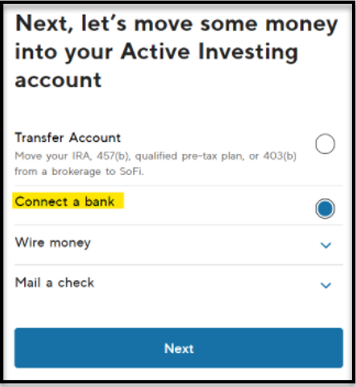
    5. Select Connect a bank and click on Next
      mceclip10.png
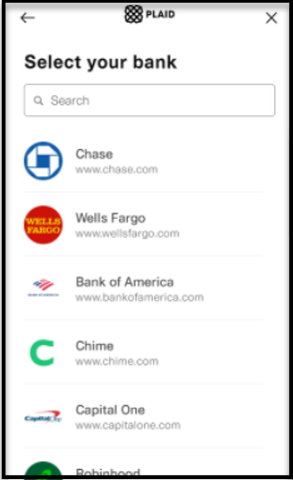
    6. You will be redirected to our 3rd party partner, Plaid. If your bank is not coming up via the search function, you can tap on the 'X' in the top right corner.
      mceclip2.png
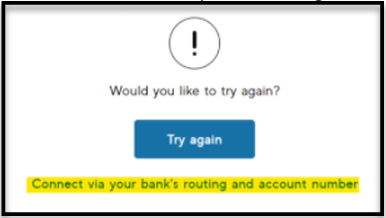
    7. Click on  Connect via your bank’s routing and account number
      mceclip11.png
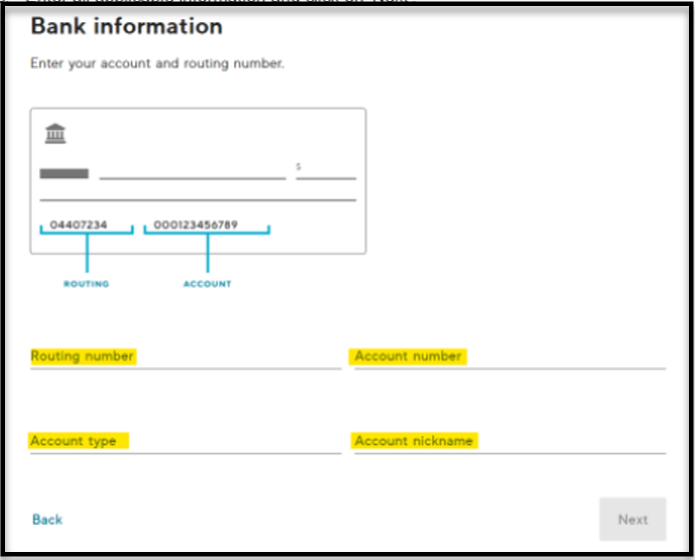
    8. Enter all applicable information and click on Next
      mceclip12.png

    You can now schedule your deposit with your new bank link. Enter the amount you want to deposit then tap on ‘Review deposit’ then you will Confirm the deposit.

      •  

    If your new bank link needs to be verified with a voided check or a monthly statement, you will receive an email and a light red banner will appear at the top of your screen prompting you to upload additional documentation. Your deposit will not be processed until your bank can be verified.